Broken links checker WordPress – Let’s discover
Your website’s credibility depends on trust and usability. But when users click a link that leads to a 404 error, they instantly lose confidence. These “dead links” damage your SEO ranking, user experience, and brand reputation.
That’s where a Broken links checker WordPress plugin becomes your best ally. It scans your entire site, detects broken links, and lets you fix them directly from the dashboard — all without touching code.
And remember, visual consistency matters too. If you’re improving your site’s layout, explore professional WordPress themes to keep your design fast, responsive, and optimized for SEO.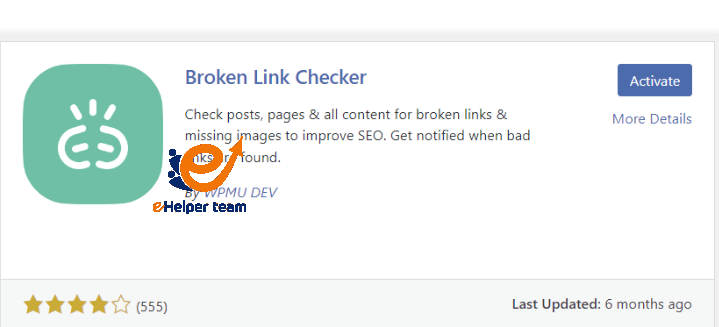
What Are Broken Links in WordPress?
A broken link happens when a hyperlink leads to a nonexistent page. It might be because:


The destination page was deleted.
The URL structure changed.
The external site went offline.
While one broken link might not seem harmful, dozens of them can make your site look outdated. Search engines treat too many broken links as a sign of poor maintenance.
Running a Broken links checker WordPress plugin ensures your links stay alive and functional. These plugins automatically crawl your website, detect issues, and allow one-click fixes.
You can also enhance your visual presentation with famous WordPress templates to maintain a professional, modern look that keeps visitors engaged longer.
Why You Should Fix Broken Links Immediately
Broken links aren’t just an inconvenience — they can seriously harm your website’s performance and SEO.
1. They Reduce Search Visibility
When Google bots encounter broken links, they stop crawling that path. This reduces your crawl efficiency, meaning some of your pages may not even appear in search results.
Using a Broken links checker WordPress plugin ensures your crawl budget is used effectively.
2. They Damage User Trust
Visitors who hit multiple broken pages are less likely to return. Imagine a customer on your product page finding a dead link — it’s like closing your store door in their face.
3. They Affect Conversion Rates
Every link should lead users closer to an action: reading more, subscribing, or purchasing. Broken links interrupt that flow. By maintaining a clean link structure, you create a smoother journey for your audience.
For example, if you’re running an eCommerce site, check out WooCommerce themes that optimize navigation and boost conversions while you ensure your internal links are working perfectly.
How to Find Broken Links in WordPress
Manually checking every link is exhausting — especially for large sites. Instead, use an automated Broken links checker WordPress tool to handle this task for you.
1. Install a Plugin
The easiest method is to install a plugin like “Broken Link Checker” or “Rank Math.” Once activated, it automatically scans all your posts, pages, and comments for broken URLs.
2. Use Online SEO Tools
If you prefer not to install plugins, online tools such as Ahrefs, Screaming Frog, or Semrush Site Audit can crawl your site and identify broken links.
3. Analyze and Fix
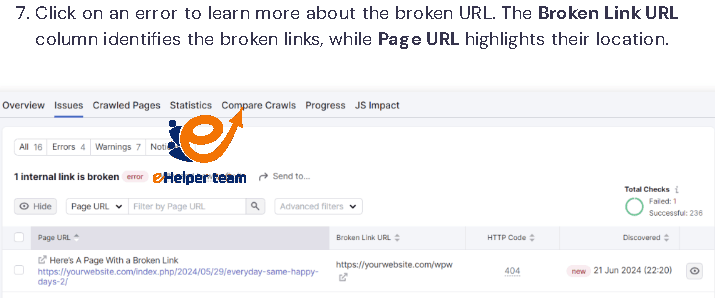
Once the scan is complete, check the report. You’ll see:
404 errors (page not found)
Redirect loops
Missing images or attachments
Fix them one by one, or set up 301 redirects to preserve link equity.
Pro Tip: After major updates or content imports, always re-run your Broken Links Checker WordPress scan to ensure everything stays healthy.
How to Fix Broken Links Efficiently
Once you’ve identified dead links, you need to fix them strategically to maintain SEO value.
1. Use 301 Redirects
When a page is permanently moved, redirect it to the new location. This tells search engines that the content has moved and transfers ranking power to the new page.
2. Update Outdated URLs
If you’ve changed post slugs or moved categories, update all internal links pointing to old URLs.
3. Replace or Remove External Dead Links
If a referenced article no longer exists, find a relevant replacement or remove it entirely. Linking to high-quality sources improves your site’s credibility.
4. Automate Future Scans
Set your plugin to run weekly or monthly scans. This ensures your site stays free from broken links without manual effort.
Best WordPress Plugins for Fixing Broken Links
Not all plugins are created equal. When choosing a Broken links checker WordPress plugin, you need one that’s reliable, fast, and easy to configure. Below are the top 5 recommended options for 2025.
1. Broken Link Checker (by WPMU DEV)
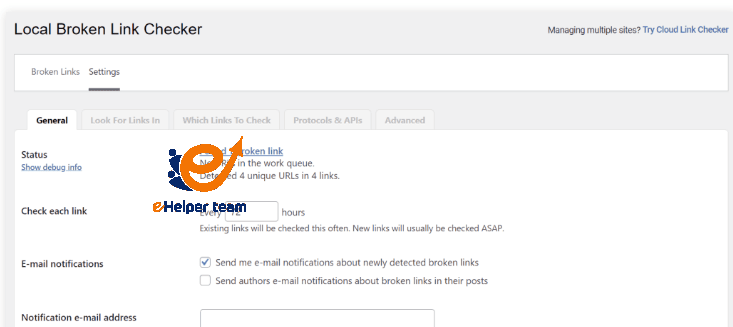
This free plugin continuously monitors your website and notifies you when it finds a broken link. You can edit or unlink directly from the dashboard without opening each page.
Key Features:
Monitors posts, comments, and external URLs.
Email notifications for new broken links.
One-click editing interface.
2. Rank Math SEO
Rank Math isn’t just for optimization; it also includes a built-in link checker feature. It integrates perfectly with WordPress and helps maintain a clean, optimized site structure.
Why It’s Great:
It combines SEO analytics with broken link detection, saving you from installing multiple tools.
3. Ahrefs Webmaster Tools
While not a plugin, Ahrefs offers an advanced site audit that catches even the smallest 404 or redirect errors. It’s perfect for agencies and businesses managing large sites.
4. Semrush Site Audit
Semrush’s crawler finds broken links, redirects, and duplicate content. It’s one of the most detailed scanners available and ideal for SEO professionals.
5. Screaming Frog SEO Spider
This desktop software crawls your entire site, showing all broken links, images, and redirects. It’s technical but extremely accurate for deep audits.
Expert Tip: Combine a Broken links checker WordPress plugin with an external crawler like Screaming Frog for maximum coverage.
Step-by-Step: How to Fix Broken Links the Right Way
Once your scan identifies issues, here’s how to fix them properly — without losing SEO value.
Step 1: Back Up Your Website
Before making changes, always back up your database and files. This ensures you can roll back if something goes wrong.
Step 2: Review the Report
Most plugins categorize errors as “404 Not Found,” “Redirected,” or “Timeout.” Start with the most critical ones (404s) because they directly impact user experience.
Step 3: Update or Redirect
For every broken internal link:
Update the link to the correct URL if it exists.
If the page was removed, set a 301 redirect to a related article.
Step 4: Recheck and Confirm
Run your Broken Links Checker WordPress scan again after fixes to verify that all errors are resolved.
Maintaining a Healthy Link Structure
A website’s structure is like a city’s road network — every route should lead somewhere meaningful. Broken links act like roadblocks that slow traffic and reduce efficiency.
- Regular Link Audits
Schedule a monthly scan to catch issues early. This is especially important after importing content, changing themes, or updating plugins.
- Update Internal Linking Strategy
When you publish new content, always link to older articles. It strengthens your SEO and reduces the chance of orphaned pages.
- Monitor External Links
Websites you link to can change over time. Check those external sources regularly to ensure they still exist and offer valuable information.
By combining these habits with your Broken Links Checker WordPress plugin, you’ll maintain a strong, efficient link structure across your entire site.
How Broken Links Affect E-commerce Sites
If you run an online store, broken links can directly affect revenue. When customers can’t reach product pages or checkout links, sales drop immediately.
- Impact on Conversions
A single broken “Buy Now” or “Add to Cart” button can cost you hundreds in lost sales. Always include link monitoring as part of your WooCommerce maintenance routine.
- Impact on SEO
Google penalizes sites with too many 404 pages, even if they’re unintentional. Keeping your links clean improves your ranking and builds user trust.
For design inspiration and optimization ideas, you can explore WooCommerce themes to make your store both functional and beautiful.
Pro Tips for Preventing Broken Links in 2025
Use short permalinks: Avoid changing URLs frequently.
Automate monitoring: Let your plugin run weekly scans automatically.
Update old posts: Whenever you refresh content, verify old links.
Add redirects instantly: Don’t wait — redirect deleted or renamed pages right away.
Keep plugins updated: Outdated tools may mismanage URLs or permalinks.
Consistency is key. The more you automate your Broken Links Checker WordPress process, the healthier your site remains.
Frequently Asked Questions (FAQ)
1. What does a Broken link checker WordPress plugin do?
It scans your website for hyperlinks that lead to missing or non-existent pages, helping you fix them quickly.
2. How often should I check for broken links?
For small blogs, once a month is enough. For high-traffic or eCommerce sites, weekly checks are recommended.
3. Do broken links affect my Google ranking?
Yes. Too many broken links send a negative signal to Google, reducing your crawl rate and authority.
4. What’s the difference between 404 and broken links?
A broken link is a hyperlink that doesn’t work; a 404 is the error message users see when they click one.
5. Can I check broken links without a plugin?
Yes, you can use external tools like Ahrefs or Semrush Site Audit, but plugins are more convenient for ongoing monitoring.
6. Will fixing broken links improve my SEO score?
Indirectly, yes. It enhances user experience and makes your site more crawlable.
7. Should I remove or redirect broken links?
Redirect internal ones to relevant pages, and remove or replace dead external ones.
8. Are all broken links bad?
Not always — some outdated resources may be intentionally removed. Just make sure they don’t appear in important content.
9. Do redirects count as broken links?
No, but too many redirect chains can slow your site and confuse crawlers.
10. What’s the best free Broken links checker WordPress plugin?
The Broken Link Checker (by WPMU DEV) remains the most reliable and beginner-friendly option in 2025.
Conclusion
Maintaining a healthy WordPress site is an ongoing process. By using a reliable Broken links checker WordPress plugin, setting up proper redirects, and auditing links regularly, you can avoid SEO penalties, keep users happy, and ensure every click leads somewhere valuable.
Combine link maintenance with optimized design using WordPress themes and famous WordPress templates, and you’ll have a site that’s not just beautiful — but built for lasting performance and trust.