How to Add Commition Junction(CJ) Affiliate Link To Your WordPress
In 2025, affiliate marketing remains one of the most reliable and scalable online income streams. Among the top-performing affiliate programs, Commission Junction (CJ) continues to dominate with its trusted reputation and global network of advertisers.
If you own a WordPress website, integrating a (CJ) Affiliate Link can help you turn your content into a steady source of revenue. CJ’s powerful tracking system and flexible tools make link management easy, giving publishers more time to focus on content creation and audience engagement.
By combining CJ’s data-driven affiliate tools with WordPress’s flexibility, you can build a seamless monetization system that grows with your audience.


What Is a (CJ) Affiliate Link and How Does It Work?
A (CJ) Affiliate Link is a special tracking URL assigned to your publisher account within the CJ Affiliate platform. It’s designed to record a user’s click and purchase, ensuring you get paid for every qualified conversion.
Here’s how it works step-by-step:
Sign up for a CJ Affiliate account and add your website.
Get approved by advertisers that fit your niche.
Generate your custom affiliate links inside the CJ dashboard.
Add those links to your WordPress site.
Earn commissions when readers buy through your links.
The signup process is quick and straightforward — getting started takes only a few minutes. Once approved, you’ll have access to a massive selection of brands and products ready to promote.
CJ’s real-time tracking and advanced analytics make it one of the most accurate systems available, ensuring that every click and conversion is properly recorded.
Why WordPress Is the Best Platform for (CJ) Affiliate Link Integration
WordPress powers over 43% of websites on the internet — and that’s not by accident. It offers flexibility, scalability, and a massive plugin ecosystem that makes affiliate marketing effortless.
When using a (CJ) Affiliate Link, WordPress provides several unbeatable advantages:
Ease of Use: You can insert links without needing coding knowledge.
SEO Optimization: Its structure helps affiliate content rank higher in search engines.
Affiliate Plugins: Tools like Pretty Links or ThirstyAffiliates simplify link management, allowing you to cloak, track, and organize your CJ links easily.
Design Freedom: WordPress supports any layout or style, letting you embed links anywhere — from blog posts to landing pages.
Unlike other affiliate networks, CJ integrates more smoothly with WordPress. Its reliable API and reporting tools make it a preferred choice for professional marketers who need both precision and scalability.
Step-by-Step Guide: How to Add (CJ) Affiliate Link To Your WordPress Site
Now, let’s go through the exact process of adding your (CJ) Affiliate Link into WordPress:
Step 1: Create and Verify Your CJ Account
Go to the CJ Affiliate homepage and register as a publisher. Fill in all details accurately — including your website, target audience, and promotional methods. Once your site is approved, you’ll get access to the advertiser marketplace.
Step 2: Choose Relevant Advertisers
Browse through thousands of advertisers inside your CJ dashboard. Select those that align with your content niche. For instance, if you run a tech blog, you might promote web hosting or software tools.
Step 3: Generate Your Affiliate Link
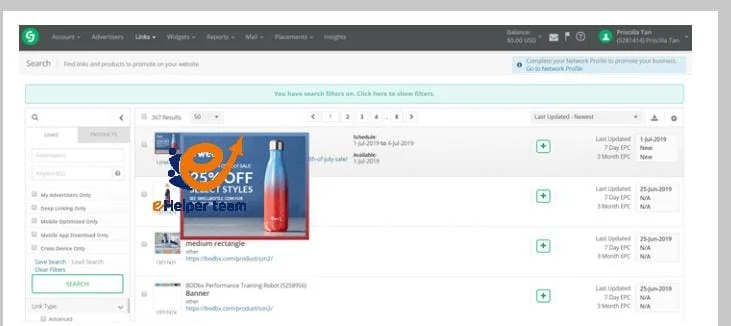
Click “Get Links” from your chosen advertiser’s page. You can choose from text, banner, or deep links depending on your content type. Copy your generated URL.
Step 4: Add the Link in WordPress
Open your post editor and highlight a relevant keyword or phrase in your content. Insert your (CJ) Affiliate Link naturally — for example, around words like best marketing platforms or recommended tools.
Step 5: Preview and Test the Links
Before publishing, test your post by clicking on every affiliate link to ensure it redirects properly.
Step 6: Track and Optimize
CJ’s detailed analytics dashboard allows you to monitor impressions, clicks, and conversions in real time. Use this data to adjust your placements and identify high-performing content.
By following these steps, your affiliate setup will be both professional and profitable.
Best Practices for Using (CJ) Affiliate Link Effectively
To make the most of your (CJ) Affiliate Link, it’s not enough to simply add links — you need a thoughtful strategy.
Here’s how to maximize performance:
Use Contextual Links: Place links naturally within your content to avoid looking spammy.
Be Transparent: Always include an affiliate disclosure to maintain reader trust.
Write Value-Rich Content: Offer genuine product reviews, comparisons, and tutorials that encourage users to take action.
Use Visual Elements: Add images or buttons with embedded CJ links to increase engagement.
Monitor Regularly: Replace expired links and update your content with fresh offers.
Leverage SEO: Combine keyword optimization with natural linking for the best results.
Advanced Strategies to Boost Your (CJ) Affiliate Link Conversions
Once your (CJ) Affiliate Link setup is live, the next step is optimization. Many beginners stop after adding links, but successful affiliates know the real magic happens when you test, analyze, and refine your strategy.
Here are several expert-level techniques to increase your affiliate conversions:
1. Use Data-Driven Content
Monitor which topics generate the most clicks and conversions using your CJ dashboard. Focus on content that resonates with your audience, such as tutorials, “best of” lists, and in-depth comparisons.
2. Experiment with Link Placement
Not all placements perform equally. Try adding affiliate links in different sections of your posts — early paragraphs, middle explanations, and final CTAs — to discover what drives the best results.
3. Build Trust First
Readers buy from websites they trust. Create long-form, helpful guides instead of pushing products aggressively. Transparency and authentic recommendations increase long-term income.
4. Implement Email Marketing
Include your (CJ) Affiliate Link in newsletters or product recommendations sent to subscribers. Email audiences convert better because they already trust your brand.
5. Optimize Your Website Speed
Page load time impacts both SEO and conversions. A slow website discourages users from clicking on your affiliate links. Optimize images, enable caching, and use a reliable hosting provider.
6. Analyze Seasonal Trends
Use analytics tools to identify seasonal demand patterns. For example, technology offers performs best during Black Friday or Cyber Monday. Adjust your content calendar accordingly.
By refining your approach based on real user data, your CJ campaigns will evolve from beginner-level promotions to consistent income sources.
On-Page SEO Optimization for Affiliate Content
SEO is the foundation of successful affiliate marketing. To maximize visibility, your affiliate posts must be optimized for both search engines and readers.
1. Craft SEO Titles and Meta Descriptions
Your title should include your main keyword (CJ) Affiliate Link and be emotionally engaging — like “Step-by-Step,” “Best,” or “Guide for 2025.” Keep your meta descriptions under 160 characters and ensure they explain the article’s benefit clearly.
2. Focus on Content Structure
Use H2 and H3 tags for organization. Keep paragraphs short, include bullet points, and use internal links to other relevant posts. This structure helps search engines understand your article better.
3. Insert Keywords Naturally
Avoid keyword stuffing — instead, integrate related terms like affiliate marketing programs, WordPress integration, and passive income strategy. Maintain a keyword density of around 1.3%.
4. Optimize Images and Alt Text
If you’re using banners or product images, include descriptive alt text. For example: “Commission Junction affiliate link integration on WordPress.”
5. Add Internal and External Links
Link to other helpful resources on your site, as well as to reputable external sites that add credibility to your content. For instance, linking to marketing research reports or platform documentation improves trust and ranking signals.
By implementing these SEO tactics, your (CJ) Affiliate Link content will rank higher, attract qualified readers, and convert far better than ordinary affiliate posts.
Common Mistakes to Avoid When Using (CJ) Affiliate Link
Even skilled marketers make mistakes that can hurt their affiliate performance. Here are the most common ones to avoid:
Overlinking: Adding too many affiliate links can look spammy and reduce trust. Keep it balanced.
Ignoring Disclosure: Not disclosing affiliate relationships can violate FTC rules and damage credibility.
Promoting Irrelevant Offers: Focus only on products that genuinely fit your content and audience.
Neglecting Analytics: Failing to track results means missing optimization opportunities.
Poor Content Quality: Weak or copied content leads to low engagement and traffic loss.
Avoiding these pitfalls ensures your strategy stays ethical, effective, and sustainable.

Frequently Asked Questions (FAQs) About (CJ) Affiliate Link
1. What is a (CJ) Affiliate Link?
A (CJ) Affiliate Link is a unique tracking URL assigned to your CJ publisher account. It records every click and purchase made through your referral.
2. How do I get approved for CJ Affiliate?
You must submit your website during signup, demonstrate real content, and comply with CJ’s policies. Approval usually takes 1–2 business days.
3. Is CJ Affiliate free to join?
Yes, joining CJ Affiliate is completely free. You only need to meet basic website quality requirements.
4. Can I use CJ links on multiple websites?
Yes, as long as each website is registered in your CJ account and follows the terms of service.
5. How do I track performance?
Your CJ dashboard includes analytics showing impressions, clicks, and conversions. You can also integrate third-party tracking plugins for deeper insights.
6. Does CJ Affiliate pay monthly?
Yes, CJ pays affiliates monthly, typically via direct deposit or Payoneer, once you reach the minimum payout threshold.
7. Can I promote any product?
You can only promote products from advertisers who have approved you. Always apply for programs that match your niche.
8. How can I increase my CJ Affiliate income?
Focus on quality content, SEO optimization, and testing link placements. High-quality traffic and trust drive more conversions.
9. Are CJ links suitable for beginners?
Absolutely. The interface is beginner-friendly, and WordPress makes adding links effortless.
10. What makes CJ better than other affiliate networks?
CJ offers reliable tracking, fast payments, and top-tier advertisers. It integrates seamlessly with WordPress and provides unmatched transparency.
Conclusion
Adding a (CJ) Affiliate Link to your WordPress website is one of the smartest ways to start earning online in 2025. With its intuitive interface, real-time analytics, and access to thousands of global brands, CJ remains the go-to platform for affiliate marketers of all levels.
By combining CJ’s advanced affiliate technology with WordPress’s SEO capabilities, you can build a fully automated, passive income system. Remember to stay consistent — publish high-quality, optimized content regularly, track your results, and always put your readers first.