5 points may cause of not appear google ads
The not appear Google Ads issue can be extremely frustrating and confusing, especially when your ads suddenly vanish from search results. Many advertisers experience this challenge, wondering whether it’s caused by a technical glitch or a policy-related restriction. In fact, Google’s advertising system relies on advanced algorithms, strict content policies, and competitive auction rules that may prevent your ads from showing up even when everything seems properly configured.
Before you panic or start tweaking every setting, it’s important to understand why your Google Ads might not appear. According to experts from the Google Ads Preview Tool, checking your ad visibility properly can save you time and prevent account penalties.
In this guide, we’ll uncover five key reasons your Google Ads might not show up and what you can do to fix them—backed by practical examples and expert insights.
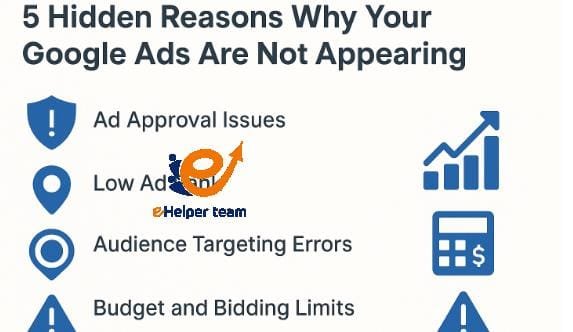


1. Ad Approval Issues: Are Your Ads Under Review or Rejected?
The most common reason for the “not appearing in Google Ads” problem is ad disapproval. Google automatically reviews all ads to ensure compliance with its advertising policies. If your ad violates even a small part of the policy—like misleading content, restricted keywords, or inappropriate visuals—it won’t show.
How to Check Ad Approval Status
You can easily check your ad’s approval status by logging into your Google Ads dashboard and looking at the “Status” column. If it says “Under Review” or “Disapproved,” your ad is not running.
Ads that violate the Ad Content Policy are automatically blocked. Some reasons include:
Using trademarked or copyrighted material without permission.
Mentioning prohibited content (like adult, gambling, or restricted health products).
Displaying misleading claims (like “guaranteed results” or “quick money”).
For more insights into monetization restrictions, refer to Make Money by Google AdSense with an easy way, which explains how Google controls ad placement and visibility.
How to Fix It
Review Google’s Ad Policies page.
Edit your ad copy or visuals to meet the guidelines.
Resubmit for review—approval can take 1–2 business days.
If you continually face not appearing in Google Ads, you may need to contact Google Ads Support to manually re-evaluate your account.
2. Low Ad Rank or Poor Quality Score
Even if your ad is approved, it might not appear because of low Ad Rank—a metric that combines your bid amount, ad quality, and expected impact.
When your Quality Score (CTR, landing page relevance, and ad relevance) is low, your ad may lose the auction to higher-performing competitors. This is a silent but very common cause of the “not appearing Google Ads” problem.
How Google Calculates Ad Rank
Ad Rank = Bid Amount × Quality Score × Ad Extensions Impact
If any of these factors fall below your competitors’, your ad will rarely or never show, even with a decent budget.
How to Improve Ad Rank
Increase your Quality Score: Focus on relevant keywords, clear ad text, and optimized landing pages.
Use ad extensions: Add sitelinks, call buttons, or location info to improve engagement.
Optimize your bids: Consider switching to “Target CPA” or “Maximize Conversions” bidding strategies.
To understand how other advertisers manage similar challenges, check out Using Google Ads to Acquire Home Care Clients. It provides a great example of effective bidding and campaign optimization.
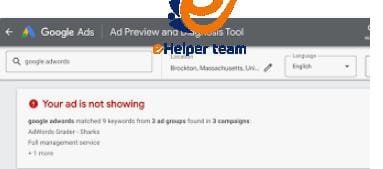
3. Audience Targeting Errors or Geographic Restrictions
Sometimes, your ad setup might be perfect — but your target audience settings are off, which can easily trigger the not appear Google Ads issue. You might be targeting countries, devices, or languages that don’t match your actual audience.
For instance, if your ad is only set to display in the United States but your potential customers are in Canada, the ad won’t appear in search results at all. Similarly, targeting too narrow an audience can severely limit impressions.
Common Targeting Mistakes
Targeting a very small region or a custom audience with little search volume.
Excluding key demographics unintentionally.
Using overlapping targeting options that limit exposure.
How to Fix Targeting Issues
Review your campaign’s Location Settings under “Settings → Locations.”
Switch from “People in or regularly in your targeted locations” to “People in, or interested in, your targeted locations.”
Broaden device and language options to include mobile, desktop, and multiple languages if relevant.
As discussed in Is there a negative side to Google ads preview tool?, improper use of preview tools or misconfigured targeting filters can also make it seem like your ads aren’t appearing when they actually are, just not for your test parameters.
4. Budget and Bidding Limits: Are You Running Out of Daily Funds?
One of the most overlooked causes of the not appear Google Ads issue is budget exhaustion. Google Ads operates on a daily budget system — once your limit is reached, your ads stop showing for the rest of the day.
If your competitors are bidding higher or your cost-per-click (CPC) increases, your daily budget may run out much faster than expected, preventing your ads from appearing.
How Budget Affects Visibility
Limited budget = fewer impressions.
High CPC keywords = faster budget depletion.
Uneven pacing = ads appear only during certain hours.
If your campaign shows “Limited by budget” in the dashboard, it means your ads are paused automatically due to insufficient funds.
Fix: Optimize and Balance Your Budget
Increase your daily budget slightly to maintain coverage.
Adjust bids using “Maximize Clicks” or “Target CPA” for better efficiency.
Schedule ads to appear during peak hours instead of all day.
Regularly check your “Budget Report” to avoid running out of funds unexpectedly.
As outlined in the article Make Money by Google AdSense with an easy way, understanding how Google distributes your ad spend helps maintain consistent ad visibility without wasting funds.
5. Keyword Conflicts and Negative Keywords Misuse
Even with a perfect ad setup, incorrect keyword targeting can lead to not appear Google Ads not appearing. Google allows you to use negative keywords — terms you don’t want your ads to show for — but if these overlap with your main keywords, your ad might never appear.
For example, if your main keyword is “buy running shoes” and you’ve mistakenly added “running” as a negative keyword, your ad won’t appear at all.
Common Keyword Problems
Overuse of exact match keywords is limiting impressions.
Adding conflicting negative keywords.
Ignoring keyword match types (broad, phrase, exact).
Solutions
Audit your keyword lists weekly.
Remove or adjust negative keywords that block main ones.
Use Google’s Keyword Planner to find balanced alternatives.
Focus on long-tail keywords to reach specific audiences.
The Google Ads Preview Tool is again a great resource to check whether your keywords trigger ads correctly across devices and locations.
Account Policy Violations or Suspensions
Lastly, your Google Ads account itself might be the problem. If your account has been flagged or suspended for violating Google’s advertising policies, your ads will stop showing immediately — even if they were previously approved, leading directly to the not appear Google Ads issue that many advertisers face.
Common Reasons for Account Suspension
Payment issues or invalid billing details.
Repeated policy violations.
Suspicious activity or multiple accounts for the same business.
Violations of the “Misrepresentation” or “Circumventing Systems” policies.
When your account is suspended, you’ll receive an email notification from Google with a reason.
How to Recover a Suspended Account
Carefully review the email details and Google’s Policy Center.
Fix the stated issues (billing, content, etc.).
Submit an appeal form through your Google Ads dashboard.
Be transparent — explain what went wrong and how you’ve fixed it.
If your suspension relates to monetization or content violations, the case study in 5 points may cause of not appear. Google ads provides real-life examples and best practices to avoid future issues.
FAQs About “Not Appear Google Ads” Issues
1. Why are my Google Ads not showing even though they’re approved?
Even if approved, your ads might not appear due to low Ad Rank, insufficient budget, or poor targeting settings. Check your campaign diagnostics for performance insights.
2. How long does it take for new Google Ads to start appearing?
Usually within 24–48 hours after approval. If it takes longer, verify your campaign status, start and end dates, and audience targeting.
3. Can ad scheduling cause my ads not to appear?
Yes. If your schedule limits display hours, your ad won’t appear outside the selected timeframe. Use “Ad Schedule” to confirm availability.
4. Does my location setting affect visibility?
Absolutely. If your target region doesn’t match your actual audience or IP, your ad may not show. Broaden your location settings slightly.
5. Can using the Google Ads Preview Tool reduce impressions?
No, the preview tool doesn’t affect impressions. It’s designed to safely check your ads without counting extra views. See the article on Google Ads Preview Tool for proper use.
6. How do I fix disapproved ads quickly?
Review the disapproval reason, correct the issue (like misleading claims or restricted content), and resubmit. Doing this promptly can help resolve the not appear Google Ads problem and avoid repeated violations that may lead to account suspension.
7. Why does my ad appear on mobile but not on desktop?
That’s likely a device targeting issue. Make sure your campaign includes both mobile and desktop under “Devices” settings.
8. Can low CTR affect ad visibility?
Yes. A very low Click-Through Rate can harm your Quality Score, lowering Ad Rank and reducing the chances of your ads appearing.
9. What happens if my account is under review?
During account review, all campaigns pause temporarily. Wait for Google’s verification or contact support if it exceeds 3–5 days.
conclusion
The frustration of facing not appear Google Ads issues can feel overwhelming — especially when you’ve invested time, creativity, and budget into your campaigns. However, as we’ve seen, these challenges often signal opportunities for optimization, compliance, and smarter strategy rather than complete failure. By understanding the root causes behind the not appear Google Ads, advertisers can transform setbacks into long-term performance improvements.
When your ads don’t appear, it’s Google’s system telling you something valuable: maybe your targeting is too narrow, your ad quality needs refinement, or your account needs policy alignment. Instead of reacting with panic, use these insights to strengthen your campaign foundation