Akismet anti-spam – 3 Steps to install this Plugin
In today’s digital landscape, spam protection is not just an option—it’s a necessity. If you run a blog, e-commerce store, or business website, you’ve probably noticed how quickly spam comments and malicious bots can flood your comment section. That’s where Akismet anti-spam steps in.
Developed by Automattic (the team behind WordPress.com), this plugin automatically filters out unwanted messages, detects suspicious links, and keeps your website safe from spammy interactions. Whether you’re a beginner or a seasoned webmaster, understanding how to install and configure Akismet can dramatically improve your website’s credibility and performance.
For those interested in affiliate-based monetization tools, such as the AliExpress affiliate program, spam protection plays an equally crucial role—it ensures your content and links remain trustworthy for both users and search engines.



What Is Akismet Anti-Spam and Why Does It Matter?
Akismet anti-spam is one of the most popular and reliable anti-spam solutions for WordPress. It works silently in the background to scan every comment, contact form submission, and message posted on your website. Using advanced algorithms and a global spam database, it detects patterns commonly used by spambots and filters them before they ever reach your moderation queue.
- How Akismet Works
Once installed, Akismet evaluates each comment’s IP address, content, and metadata. If something looks suspicious—such as repeated phrases, harmful URLs, or automated posting—it’s flagged as spam. You can then review or delete it directly from your WordPress dashboard.
- Why It’s Essential
Without spam protection, your website can suffer from:
Reduced credibility among users
Security risks from malicious links
Wasted time managing spam manually
SEO penalties from toxic outbound links
Akismet solves these problems automatically. It keeps your content clean, your website fast, and your comment section authentic.
If you’ve ever worked in affiliate marketing, you’ll know that spam-free comments can also improve conversion rates and user trust. For example, websites participating in the Affiliate with Aliexpress program often rely on user engagement—something only possible when spam is under control.
3 Steps to install this Plugin
Step 1 – Installing the Akismet Anti-Spam Plugin
Installing Akismet anti-spam is a straightforward process that even beginners can complete in minutes. Here’s how to get started:
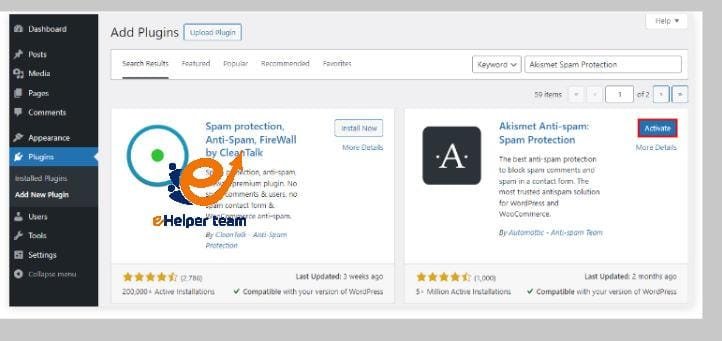
Go to Your WordPress Dashboard: Log in and navigate to Plugins → Add New.
Search for Akismet Anti-Spam: Type “Akismet” into the search bar. It’s usually the first result, developed by Automattic.
Click Install Now, then activate the plugin once the installation completes.
Create or Log In to a WordPress.com Account: Akismet requires an API key to function. You’ll need to either log in with your WordPress.com credentials or create a new account.
Once activated, the plugin automatically starts filtering incoming comments. You’ll notice a “Spam” section appear in your comment moderation panel.
Choosing a Plan
Akismet offers both free and premium plans.
Free version: Perfect for personal blogs.
Premium plans: Include advanced spam stats, priority support, and commercial-use licenses.
For professional or business websites—like affiliate blogs or e-commerce stores using tools such as the Affiliate Marketing Commissions setup guide—premium is worth every cent for its enhanced protection and analytics.
Step 2 – Connecting and Configuring Akismet Anti-Spam
After installation, you’ll need to connect Akismet to your website using an API key. This key allows your site to communicate with Akismet’s global spam database.
Here’s how to do it:
Click “Set up your Akismet account” from the plugin page.
Enter your API Key: If you don’t have one, click “Get your API key.” Follow the prompts on Akismet.com to obtain it.
Paste the key into your WordPress settings under Akismet Settings → API Key.
Save Changes.
Optional Configurations
You can choose whether Akismet should:
Auto-delete the worst spam
Send notifications when spam is detected
Show spam statistics in your dashboard
If you manage a high-traffic or affiliate-based website, these settings are invaluable. They provide real-time insights into spam trends and help keep your content free of junk interactions that could damage your SEO performance.
Step 3 – Testing and Monitoring Akismet Anti-Spam Performance
Once you’ve successfully connected the plugin, it’s time to test and monitor Akismet anti-spam to ensure it’s working as intended.
Testing Akismet’s Effectiveness
Leave a Test Comment: Try posting a comment with suspicious or spam-like text (e.g., multiple links or promotional phrases).
Check the Spam Folder: Navigate to Comments → Spam and confirm Akismet has filtered it correctly.
Review Legitimate Comments: Ensure real, user-generated comments are not being misclassified as spam.
Monitoring Spam Statistics
Akismet provides a helpful dashboard that displays:
The number of spam comments blocked
The ratio of spam to legitimate messages
Historical data over time
These metrics help you gauge how effective the plugin is. Regularly reviewing them ensures optimal configuration and helps identify patterns of spam attacks targeting your site.
Integrating Akismet with Other Plugins
Akismet works seamlessly with popular form builders like Contact Form 7, WPForms, and Gravity Forms, automatically filtering out spam submissions.
If you’re running an affiliate website, particularly with platforms like AliExpress affiliate, combining Akismet with form protection tools prevents fraudulent submissions and fake leads, keeping your campaigns clean and efficient.
The Role of Akismet Anti-Spam in Website SEO
It’s easy to underestimate how spam comments can hurt your search engine optimization (SEO). Google’s algorithms prioritize clean, secure, and user-friendly websites. When spam comments flood your pages with malicious or irrelevant links, they can degrade your SEO ranking significantly.
SEO Benefits of Akismet
Improves Content Quality: By blocking irrelevant comments, your posts remain contextually clean.
Prevents Outbound Spam Links: Stops harmful links from being indexed by search engines.
Enhances Page Speed: Reduces server load caused by spam processing.
Increases User Trust: Visitors see a well-maintained, moderated comment section, boosting credibility.
For affiliate and e-commerce websites, like those leveraging the Affiliate with Aliexpress program, spam control isn’t optional—it’s essential. A spam-free site builds trust with both users and search engines, helping increase conversions and organic reach.
Combining Akismet with Other SEO Plugins
For best results, pair Akismet with tools such as Yoast SEO or Rank Math. These combinations create a robust framework that covers both on-page optimization and spam defense, helping you maintain high visibility without compromising security.
Common Issues When Using Akismet Anti-Spam (and How to Fix Them)
Even the most reliable plugins can run into occasional hiccups. Here are the most common Akismet-related issues and their quick fixes.
1. API Key Problems
If Akismet reports “Invalid API Key,” ensure you’ve copied it correctly from your Akismet dashboard. Sometimes, reactivating the plugin or refreshing the connection solves the issue.
2. False Positives
Legitimate comments occasionally get marked as spam. You can manually mark them as “Not Spam” in your WordPress comment section. Akismet learns from these corrections and adjusts its filters accordingly.
3. Plugin Conflicts
Some caching or firewall plugins may interfere with Akismet’s communication with the server. Temporarily disable other plugins to identify conflicts.
4. High Spam Volume Still Appearing
If spam continues slipping through, ensure that your Akismet subscription is active and that your API key hasn’t expired. Updating to the latest version also helps.
For WordPress users running affiliate marketing websites, spam management is directly tied to campaign success. Clean, genuine engagement leads to better conversion rates—something emphasized in the Affiliate Marketing Commissions guide.
Akismet Anti-Spam vs. Other Spam Protection Tools
While Akismet is arguably the most popular spam defense solution, it’s worth comparing it with other plugins to understand its strengths.
| Plugin Name | Free Version | Real-Time Filtering | Integration with Forms | Commercial Use |
|---|---|---|---|---|
| Akismet Anti-Spam | Yes | Yes | Yes | Yes |
| Antispam Bee | Yes | No | Limited | No |
| WP Armour | Yes | Yes | Limited | Yes |
| CleanTalk | Paid | Yes | Yes | Yes |
Why Akismet Wins
Maintained by WordPress’s parent company (Automattic)
Backed by a massive global spam database
Requires minimal setup and maintenance
Offers continuous updates and learning algorithms
For professionals managing blogs or affiliate sites, Akismet provides a hands-free, scalable solution that grows with your website traffic and needs.
Future of Spam Protection in WordPress
The evolution of spam protection is heading toward AI-driven solutions. Akismet already incorporates machine learning algorithms to detect emerging spam trends. In the near future, we can expect:
Deeper integration with AI tools to predict spam behavior
Real-time user reputation scoring
Cross-platform spam detection for comments, messages, and forms
With WordPress powering nearly half of all websites worldwide, Akismet anti-spam continues to be a cornerstone of WordPress security and reliability. Staying updated ensures your site remains resilient in the face of evolving online threats.
FAQs About Akismet Anti-Spam Plugin
1. What is Akismet anti-spam?
It’s a WordPress plugin that automatically filters out spam comments and form submissions using advanced algorithms and a shared spam database.
2. Is Akismet free?
Yes, Akismet offers a free plan for personal blogs and paid options for business or commercial use.
3. How do I get my Akismet API key?
Visit Akismet.com, sign up or log in with your WordPress.com account, and copy your API key to paste into your WordPress settings.
4. Can Akismet delete spam automatically?
Yes, you can enable automatic deletion of the worst spam from the settings panel.
5. Does Akismet affect website speed?
No, Akismet is lightweight and optimized for performance, ensuring minimal impact on page load times.
6. How accurate is Akismet?
Extremely accurate — it uses real-time data from millions of sites to identify spam patterns effectively.
7. Can Akismet protect contact forms?
Yes, it integrates with popular contact form plugins like WPForms and Contact Form 7.
8. Is Akismet suitable for affiliate websites?
Absolutely. It keeps your affiliate pages free of spam links, preserving both trust and SEO rankings.
9. What happens if Akismet marks real comments as spam?
You can manually review and approve them. Akismet learns from these corrections over time.
10. How often should I update Akismet?
Always keep the plugin updated to ensure maximum protection and compatibility with new versions of WordPress.
Conclusion
Spam is an invisible enemy of website performance, reputation, and user trust. Installing Akismet anti-spam is one of the simplest yet most powerful steps you can take to protect your WordPress website.
In just three steps, you can automate spam detection, enhance SEO, and create a safer, cleaner experience for your readers. Whether you’re managing a personal blog, a company page, or an affiliate website, Akismet remains the most reliable choice for maintaining integrity and performance.