How to create a LinkedIn account step by step
In today’s digital-first professional world, having a strong online presence is no longer optional—it’s essential. Whether you’re a student entering the job market, a freelancer seeking clients, or a business professional expanding your network, LinkedIn is your go-to platform for professional growth. Understanding how to create a LinkedIn account properly can open doors to countless opportunities.
LinkedIn connects you with recruiters, industry experts, and potential partners across the globe. According to recent reports, over 1 billion users now use LinkedIn to showcase their professional identity. But the question remains: How can you set up a LinkedIn profile that stands out and truly reflects your skills and goals?
Before we dive into the process, check this helpful LinkedIn Showcase Pages guide from E Helper Team—it explains how to create showcase pages that complement your personal profile and strengthen your brand visibility.
Let’s explore the step-by-step guide to creating your LinkedIn account efficiently, while also learning how to optimize it for long-term success.


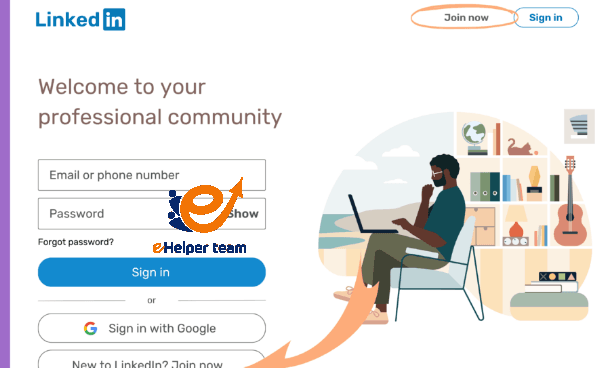
How to Create a LinkedIn Account – Step-by-Step Walkthrough
Creating a LinkedIn account is a straightforward process, but setting it up correctly can make a world of difference. Follow these essential steps to create a LinkedIn account that not only looks professional but also attracts the right attention.
Step 1: Visit the Official LinkedIn Website
Head to linkedin.com and click “Join now.” Enter your first name, last name, and professional email address. It’s highly recommended to use a business or professional email instead of a personal one. If you haven’t set up a professional email yet, you can learn how from this detailed business email setup guide—it’s an invaluable resource to make your communication look credible.
Step 2: Verify and Secure Your Account
After entering your email, you’ll receive a verification code. Once verified, choose a strong password to protect your information. LinkedIn emphasizes account security, particularly for professionals who handle sensitive data.
Step 3: Add Your Location and Job Title
Your location helps LinkedIn suggest relevant job opportunities near you. Adding a clear job title ensures recruiters understand your field of expertise. For example, write “Marketing Specialist | SEO Expert” instead of a vague “Marketer.”
Step 4: Upload a Professional Profile Photo
A professional photo increases your chances of getting noticed. LinkedIn data shows that profiles with photos receive 21 times more profile views than those without one. Choose a clear, friendly, and well-lit headshot against a neutral background.
Step 5: Customize Your LinkedIn URL
A custom LinkedIn URL looks cleaner and more professional—ideal for adding to your resume or email signature. Go to your profile settings and edit your Public Profile URL (e.g., linkedin.com/in/yourname).
By completing these steps, you’ve successfully learned how to create a LinkedIn account. But that’s just the beginning—the next part focuses on building a profile that attracts opportunities.
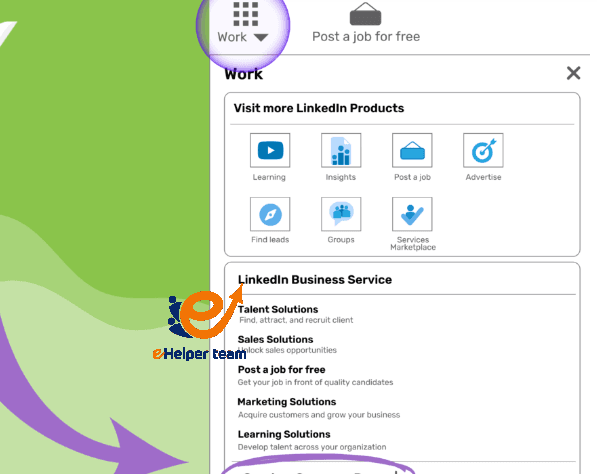
Building a Standout LinkedIn Profile
Your LinkedIn profile is your digital resume—it tells your story, highlights your expertise, and builds credibility. Once you create a LinkedIn account, it’s time to make it shine.
1. Craft a Compelling Headline
Your headline appears right under your name and should describe what you do and what you offer. For instance, instead of “Software Engineer,” write “Software Engineer | Full-Stack Developer | AI Enthusiast.” This makes your profile more searchable and keyword-rich.
2. Write a Professional Summary
Your summary (or About section) should be concise yet engaging. It’s your elevator pitch—use 3–4 short paragraphs to describe your skills, achievements, and what makes you unique. Mention your career goals and include relevant keywords so recruiters can find you easily.
3. Highlight Your Experience and Education
Add your previous roles, accomplishments, and educational background. Be specific about your contributions and results—use bullet points for clarity. Don’t forget to include certifications, volunteer work, or awards.
4. Add a Background Banner
A background image adds visual appeal. Choose a banner that reflects your industry—for example, a tech-themed design for IT professionals or a creative layout for designers.
5. Optimize for Search (LinkedIn SEO)
Just like websites, LinkedIn profiles benefit from optimization. Use keywords like “project management,” “content strategy,” or “digital marketing” naturally throughout your profile to increase visibility in search results.
Connecting and Networking Effectively
After you create a LinkedIn account, the next crucial step is networking. Building genuine connections on LinkedIn can help you discover new opportunities, collaborate with peers, and stay updated with industry trends.
1. Start with People You Know
Begin by connecting with colleagues, classmates, and mentors. LinkedIn’s algorithm will then suggest people within your extended network.
2. Personalize Connection Requests
Avoid sending generic connection invites. Instead, write a short personalized message explaining how you know them or why you’d like to connect. This small gesture increases your acceptance rate significantly.
3. Join Professional Groups
LinkedIn Groups are hubs for professionals who share the same interests. Participate in discussions, share insights, and engage with posts. It’s a subtle but powerful way to get noticed.
4. Follow Companies and Industry Leaders
Following relevant pages helps you stay informed about company news, job openings, and thought leadership content. You can also interact with their posts to build visibility.
5. Post and Engage Consistently
Don’t just scroll—engage! Share your professional insights, comment on posts, and publish short articles. Consistent activity strengthens your personal brand and helps you stay visible within your network.
For a deeper understanding of how professional social media engagement can increase your reach and build credibility, explore this insightful guide to building a successful social media page.
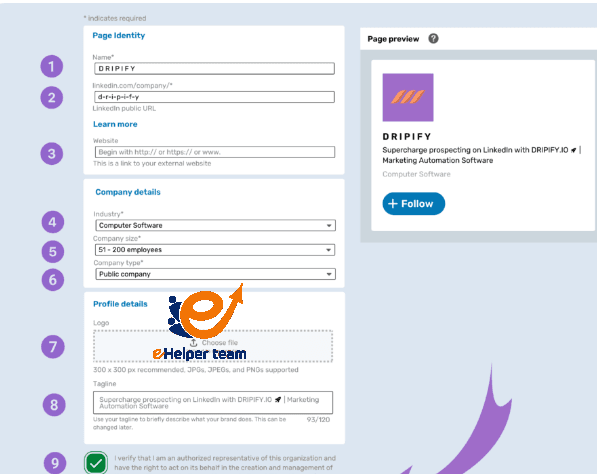
Optimizing Your LinkedIn Account for Maximum Visibility
After you create a LinkedIn account and complete your profile, optimization becomes the next crucial step. Optimization ensures that recruiters, potential clients, and collaborators can easily find you when searching for professionals with your skills.
1. Use Strategic Keywords
Think of LinkedIn as a professional search engine. When you include the right keywords—like digital marketing, project management, or data analysis—your profile appears in more search results. Strategically place these terms in your headline, summary, and experience sections.
2. Enable “Open to Work” Feature
If you’re actively seeking a job, turn on the “Open to Work” option under your profile settings. This tells recruiters that you’re available, increasing your visibility in candidate searches.
3. Add Skills and Get Endorsements
Adding at least five to ten relevant skills increases the credibility of your profile. Encourage colleagues or clients to endorse your skills—it signals authenticity to recruiters.
4. Request Recommendations
Recommendations are testimonials of your professionalism. Ask past supervisors or team members to write a few sentences about your work ethic or results. It adds social proof that can influence hiring decisions.
5. Maintain a Consistent Posting Schedule
Post once or twice a week about topics related to your field. This keeps your network engaged and positions you as an active thought leader. Articles, polls, and personal reflections perform especially well.
For a detailed overview of how to maintain consistency across professional platforms, check out this in-depth content planning resource—it complements LinkedIn activity planning and SEO visibility.
Using LinkedIn to Find Jobs and Opportunities
Once you create a LinkedIn account, it can become your most powerful job-hunting tool—if you know how to use it correctly.
1. Leverage the “Jobs” Tab
LinkedIn’s Jobs tab allows you to filter opportunities by location, company, experience level, and job type. You can even set up alerts to get notified when new roles match your preferences.
2. Follow Company Pages
By following companies, you’ll be the first to see job postings, industry news, and internal updates. This helps you stay informed about organizations you’re targeting.
3. Engage with Recruiters
Don’t hesitate to reach out to recruiters with a short, polite message. Let them know you’re interested in specific positions and attach your resume. You can also share your custom LinkedIn profile URL in your email signature to make it easier for them to view your background.
4. Showcase Your Achievements
Use the “Featured” section to display your best work—case studies, presentations, certificates, or publications. Visual elements grab attention and demonstrate real results.
5. Join Career-Related Events and Webinars
LinkedIn frequently hosts virtual career fairs and industry events. Participating in these sessions helps you gain insights, expand your network, and stand out as an active professional in your field.
Keeping Your LinkedIn Profile Updated and Engaging
Your LinkedIn profile is a living document—it should evolve as your career does. Keeping it up to date ensures your professional brand stays relevant.
1. Refresh Your Summary Regularly
Update your summary every few months to reflect your recent projects, promotions, or new skills. Highlight measurable achievements to make your story more compelling.
2. Add New Skills and Certificates
Whenever you complete a course or gain a new certification, list it. Continuous learning signals to employers that you’re committed to growth.
3. Celebrate Milestones
Share professional milestones like work anniversaries or successful project completions. It keeps your network informed and engaged with your journey.
4. Monitor Analytics
LinkedIn provides valuable data—like who’s viewing your profile and how often your posts are seen. Use these insights to refine your strategy and content.
5. Balance Professionalism and Authenticity
While maintaining professionalism, don’t be afraid to show personality. Authenticity builds stronger, more relatable connections.
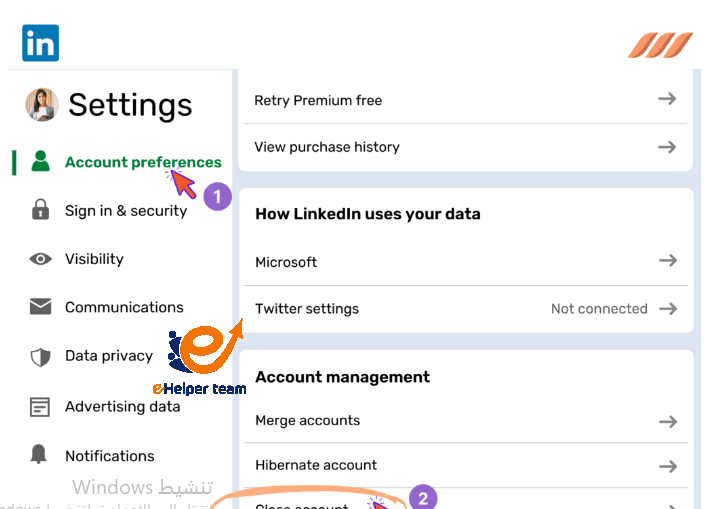
Frequently Asked Questions (FAQs)
1. How do I create a LinkedIn account for free?
You can create a LinkedIn account by visiting linkedin.com, clicking “Join now,” and following the registration steps using your email address.
2. Is LinkedIn free to use?
Yes. The basic features are free, including profile creation, networking, and job searching. Premium plans offer advanced analytics and learning tools.
3. What makes a good LinkedIn profile photo?
A professional, high-quality headshot with good lighting, neutral background, and a friendly expression works best.
4. How can I make my profile stand out?
Use a compelling headline, a detailed summary, and add measurable results to your job descriptions. Include relevant keywords naturally.
5. How do I find jobs on LinkedIn?
Go to the “Jobs” section, filter by keywords or location, and save searches to get updates on new openings.
6. How often should I post on LinkedIn?
Posting one to two times per week is ideal to maintain engagement without overwhelming your audience.
7. Should I connect with people I don’t know?
Yes—but only if they’re relevant to your industry or professional interests. Always personalize your connection request.
8. How can I get more endorsements?
Ask colleagues, clients, or peers to endorse your skills, and return the favor. Engagement encourages reciprocity.
9. What should I write in my LinkedIn summary?
Write a concise story that showcases your background, skills, achievements, and professional goals. End with a call to connect or collaborate.
10. How can I protect my privacy on LinkedIn?
Adjust your privacy settings under “Account Preferences.” You can control who sees your connections, activity, and personal details.
Conclusion
Learning how to create a LinkedIn account is just the beginning—it’s your foundation for professional success in the digital age. A well-optimized profile can lead to meaningful collaborations, career growth, and lifelong learning opportunities.
Consistency, authenticity, and engagement are key to unlocking the full potential of your LinkedIn presence. Update your profile regularly, connect strategically, and keep learning to stay ahead in your career journey.


